Your CRM is not on the list. Connecting messengers through ApiX-Drive and Wepster
There are more than 20 ready-made integrations and they cover the systems most companies run. But the world holds thousands of industry-specific and regional CRMs, so the odds of finding yours on any given list are modest. Being absent from the list has long since stopped meaning “impossible” and started meaning “through an intermediate layer”. Below is a comparison of two platforms, the setup order with a walkthrough of field mapping, and an honest account of what you give up by working through a middleman.
Key takeaways:
- A missing CRM is solved three ways — the ApiX-Drive connector, the Wepster platform, or your own build against the API
- ApiX-Drive moves data between systems, Wepster adds its own layer for handling conversations
- An intermediate layer adds latency and a dependency on a third party, and your process has to account for both
- Errors show up in field mapping and phone number formatting far more often than in the connector itself
- A full test cycle fits inside the 7 free days and ends with a salesperson working real conversations
- A connector cannot put the conversation inside your CRM interface the way a native integration does
ApiX-Drive and Wepster compared
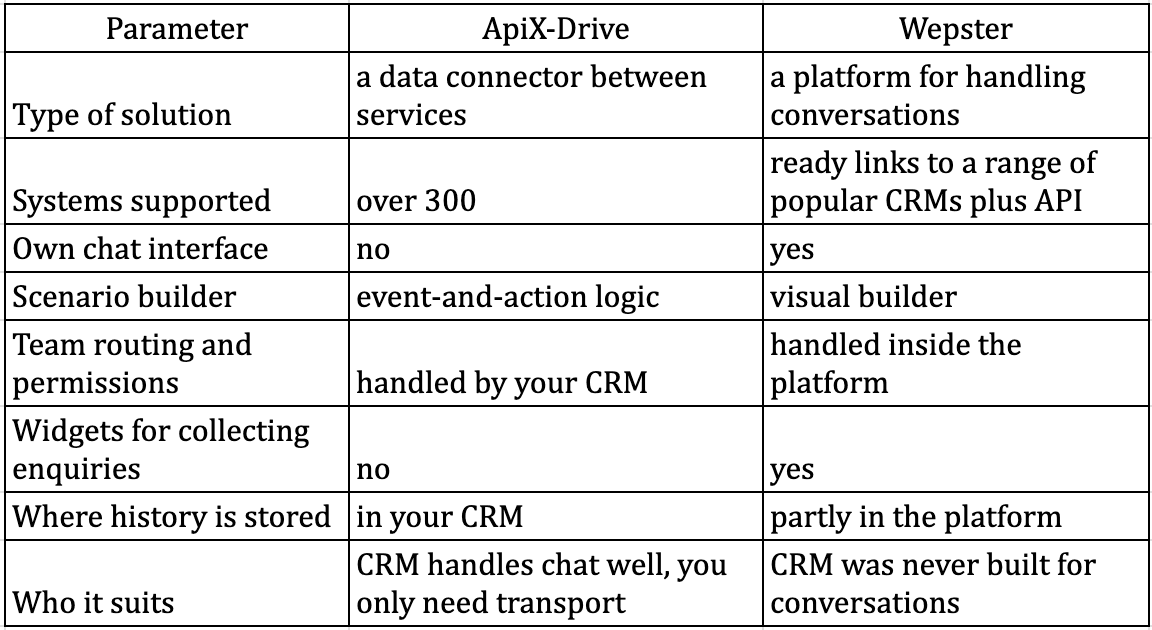
We put this table together after reviewing what both platforms do and the scenarios each one suits.
ApiX-Drive links systems on event-and-action logic
The platform needs no programming and connects over 300 services. The logic is simple — when something happens in one system, a corresponding operation runs in another.
For our purposes that means two directions of transfer. Outbound messages leave the CRM on events, and inbound messages come back from the messenger attached to the right customer.
Setup runs through a step-by-step wizard and, in a straightforward configuration, takes a few hours including testing.
Wepster adds a layer on top of your systems rather than between them
This platform is built differently. Inside it there is a shared team inbox, routing across departments and groups, automatic greetings and reminders, widgets for collecting enquiries and a visual scenario builder.
Ready-made links exist for a number of popular systems, and there is an API. Per-user permission settings let you separate sales from support without maintaining separate numbers.
The choice comes down to whether your CRM can hold a conversation
Accounting and industry systems often run orders beautifully and are entirely unsuited to messaging a customer. In that case it makes more sense to hold the conversation in a purpose-built interface and push the outcome into the CRM.
If your system can show a message thread inside the customer card, an extra interface only splits your team’s attention and a data connector is enough.
What you lose and what you keep with a middleman
One working term. The source of truth is the system whose data is treated as correct when the two disagree. Working through a connector gives you two candidates, and you need to decide which one wins before setup rather than after the first discrepancy.
Latency, dependency and depth of integration
An intermediate layer adds delay, typically from seconds to a minute depending on refresh settings.
An outage at the connector looks to your team like an outage at the messenger, and troubleshooting now spans three places instead of two.
A connector moves data, but it does not embed a chat window inside your CRM the way a native integration does. Your salesperson receives a record rather than a live conversation, and the team’s workflow has to be planned around that.
The core value of integration is reachable by any of the three routes
Conversations attach to the customer, history stays inside the company’s system rather than on a salesperson’s phone, and event-driven automated messages work.
What differs is convenience and speed, not the capability itself.
Setup order
A working number first, the connector second
Connect the number in E-chat. Register, activate the number on Viber, Telegram or WhatsApp with confirmation from the phone, then let it sync.
Configuring the connector before the number works is pointless, because half the errors at that stage will turn out to have nothing to do with the connector.
Field mapping produces more failures than the connection itself
Inside the platform you create the link between systems. You specify the source, the destination and how the fields correspond. This is where most mistakes are made.
Normalise phone numbers to international format on the CRM side before transfer. If your database holds numbers in four different spellings, matching inbound messages to customers will work intermittently and the connector will get the blame, even though the cause is your data.
Once auto-refresh is on, test on a real conversation rather than a test record.
Three decisions to make before launch
What happens to a message from an unknown number — a contact is created, a deal is created, or the enquiry lands in a separate list for review. Changing this later costs more than deciding it now.
How duplicates are handled. One customer may write from two numbers, and without a merge rule your database fills with twins.
Where to see the transfer log. When a message goes missing a month from now, that log will be the only place to find out where.
A separate risk from changes on the CRM side
A situation that breaks the link with no connector outage at all. An administrator renames a field or adds a required attribute to the card, and transfers start failing with an error. Set a rule — any change to the card structure is followed by a check of the link the same day.
Expert note
Integrators who build these links regularly report the same pattern. The client almost always asks to push everything into the CRM, every message, every read receipt, every attachment. Two months later it turns out nobody opens most of that data, while the link has become brittle and breaks whenever anything changes on either side. The working approach is the reverse — a minimal set at launch. Inbound messages attached to the customer, and outbound on two or three key events. That covers the core value and rarely breaks. Extend it only when a specific person turns up with a specific task that needs specific data.
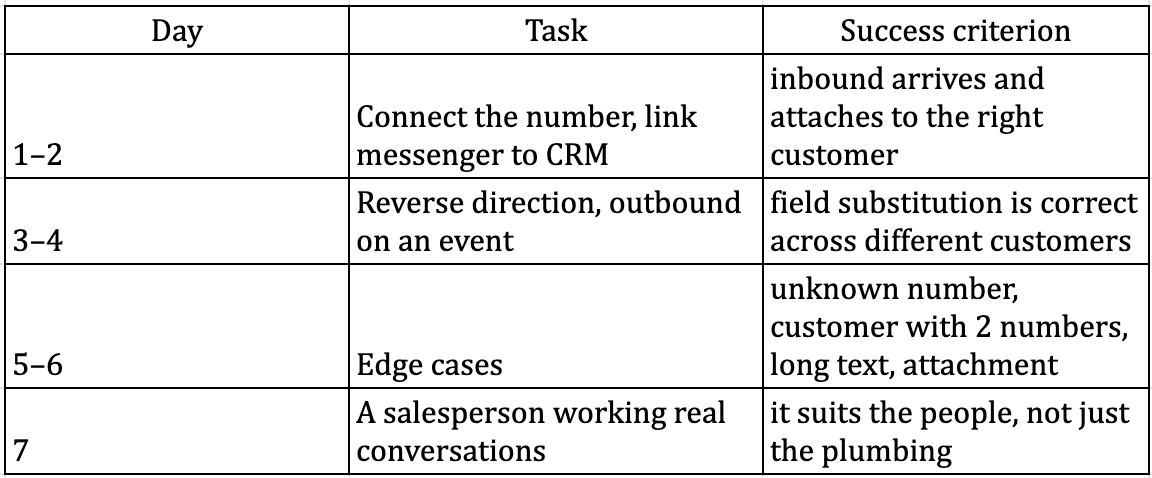
A seven-day test plan
Three criteria for deciding whether to pay
Inbound messages reach the right card without manual intervention in more than 95% of cases.
The delay between a message and its appearance in the CRM stays under a minute.
The salesperson can reply without leaving their usual working window, or by stepping into one clearly defined place.
If even one criterion fails, the cause is either the field setup or the chosen route. Do not move to payment and team training before that is fixed.
Three signs the connector has been outgrown
Delays have become noticeable to salespeople and customers. Routing logic no longer fits inside the interface rules. The number of manual corrections in the CRM grows month on month.
That is the point to look at the API. Documentation is published separately for each messenger, work starts with creating the channel, and everything you learned on the connector turns into a precise technical brief.
When a connector is the wrong answer
Storing history in two places creates ambiguity
The convenient claim is that you can connect any CRM with no development. The counter-argument is that when you work through a platform with its own interface, part of the history lives there and part lives in the CRM, and the question “where is the full conversation” now has two answers.
The limit follows from that. Before rollout, appoint a source of truth and agree that its data wins in a conflict. In practice, record that decision in writing and confirm how history can be exported if you ever leave the platform.
Sub-second latency requirements rule the middleman out
If your process depends on immediate reaction — dispatching field crews, say, or confirming a time-limited booking — a delay of tens of seconds breaks the scenario.
That leaves either your own API integration or a native connector, if your system happens to be on the supported list.
What we have not verified
The range of seconds to a minute is a working estimate, not a measured value. It depends on refresh settings, on load and on the particular pair of systems, so measure it on your own link over a week.
We also do not cover the platforms’ pricing models, since they change and depend on the volume of data moved. Check them on the vendors’ own sites at the moment you implement.
FAQ:
Question: Can we connect several messengers through one connector
Answer: Yes, each number is connected separately and feeds the same CRM. A common setup for companies with customers in several countries is two or three numbers across different messengers under one system
Question: Do we keep the ability to message a customer first
Answer: Yes. That capability belongs to the service itself and does not depend on how you connect to the CRM. Through a connector it is triggered by the same kind of event as any other outbound message
Question: What happens if the connector goes down
Answer: Messages stop moving between systems while the conversation in the messenger itself keeps working. That is why you need latency monitoring and a fallback procedure for your team during an outage
Question: Do we need a developer for the setup
Answer: Not for a standard link, both options are configured through the interface. A technical specialist is needed if the CRM has to raise custom events or process data before transfer
Question: How long does moving from a connector to our own integration take
Answer: It depends on how much logic is involved, but a skeleton that receives inbound, queues outbound and handles statuses takes roughly a week. Keep the connector running until the switch is complete
Was this article helpful?
Share it with colleagues who might need it
Connect messengers to your CRM
Message clients first right from the client card and keep all conversations in your CRM. 7-day free trial, up to 40% off when connecting several numbers.
Read also
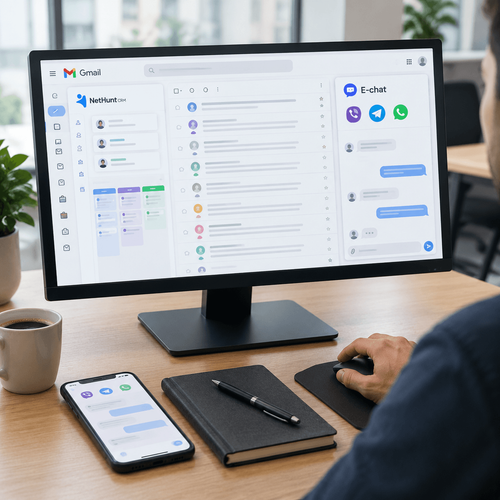
NetHunt CRM plus E-chat. Messengers inside your Gmail workspace
TikTok inside your CRM — stop losing leads from DMs and comments
Messenger integration with Kommo. A full overview
Customers stopped answering calls from unknown numbers a long time ago, yet they read a Telegram or WhatsApp message within the hour. A sales team still living on calls and email hands deals to competitors every day — competitors who reply in the messenger within 2 minutes, straight from a Kommo lead card. This overview covers how a messenger-to-Kommo setup works using E-chat as the example, which deal scenarios it handles, how to configure automated messages by pipeline stage, and what managers and integrators should consider before launch.