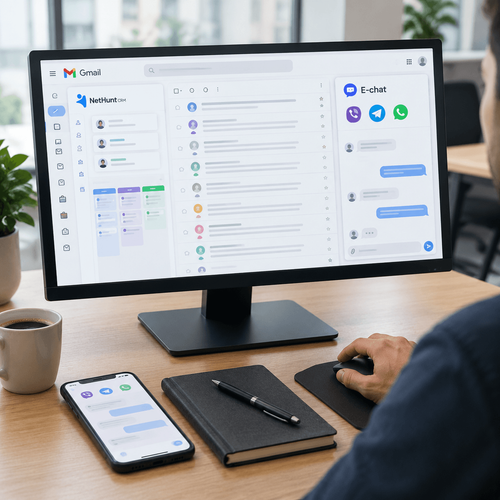
Messenger integration with Kommo. A full overview
Customers stopped answering calls from unknown numbers a long time ago, yet they read a Telegram or WhatsApp message within the hour. A sales team still living on calls and email hands deals to competitors every day — competitors who reply in the messenger within 2 minutes, straight from a Kommo lead card. This overview covers how a messenger-to-Kommo setup works using E-chat as the example, which deal scenarios it handles, how to configure automated messages by pipeline stage, and what managers and integrators should consider before launch.
Customers stopped answering calls from unknown numbers a long time ago, yet they read a Telegram or WhatsApp message within the hour. A sales team still living on calls and email hands deals to competitors every day — competitors who reply in the messenger within 2 minutes, straight from a Kommo lead card. This overview covers how a messenger-to-Kommo setup works using E-chat as the example, which deal scenarios it handles, how to configure automated messages by pipeline stage, and what managers and integrators should consider before launch.
Key takeaways:
- E-chat connects ordinary phone-number-based WhatsApp, Telegram and Viber accounts to Kommo — conversations happen in the lead card and reps never need the apps themselves
- You can message a customer first even if they have never contacted you; a phone number in the card is enough
- Messages from a personal number get a 20–30 % response rate, while chatbot broadcasts see around 10 % engagement
- Automated messages attach to pipeline stages through Salesbot and Kommo’s digital pipeline — greetings, payment reminders and review requests go out without a rep
- The full history stays in the CRM. A departing employee cannot take the base, because they never had access to the messenger accounts
- Setup takes about 15 minutes, the first 7 days are free, and paying for 12 months brings the discount to 40 %
Why Kommo needs messengers at all
Kommo tracks deals, builds pipelines and reminds people about tasks, but it does not talk to customers on its own. Communication channels are connected separately. Telephony became standard years ago, yet many companies still run messengers manually, from reps’ personal phones. The outcome is predictable: conversations live in other people’s smartphones, managers cannot see them, and the history disappears when the employee does.
An integration fixes this at the root. Messages from WhatsApp, Telegram and Viber land directly in the lead card, the rep replies from the familiar Kommo interface, and the system records every word. Delivery latency in E-chat stays under 30 seconds for text and 60 for media.
What happens without an integration
Any sales manager will recognise the picture. An enquiry arrives on WhatsApp on a rep’s phone, they answer between meetings, forget to create the deal, and the customer evaporates. There is no way to check what was said to that customer, and no way to calculate channel conversion. When the rep leaves, the conversations go with them and often the contacts too.
Response speed is a separate problem. While a message sits unread on a personal phone, the customer writes to 2 or 3 more companies. Whoever answers first wins, and that race cannot be won without a single window inside the CRM.
Why a personal number outperforms a bot
Some numbers are worth knowing before choosing a tool. Automated chatbot messages get a response from about 10 % of recipients, and fewer than 1 % reach a purchase. Messages from a regular number-based account see 20–30 % engagement. People are tired of robots and engage more readily when they see a real profile with a name and a photo.
E-chat builds its integration on number-based accounts rather than public bots. The customer receives the message as though a person wrote to them, while the entire conversation stays under the CRM’s control.
How the E-chat solution for Kommo works
E-chat has a dedicated product for Kommo: a widget installs on the CRM side and numbers are activated in the service dashboard. No code is required and the whole setup follows a step-by-step guide. The service has been on the market for more than 6 years and passes over 400,000 messages a day, so it comfortably handles a sales team of any size.
Connecting in 4 steps
Step 1 is creating an E-chat account, which takes a couple of minutes. Step 2 is activating numbers: you add company WhatsApp, Telegram or Viber numbers and confirm from a mobile device, much like signing in to a desktop version of the messenger. Step 3 is synchronisation, which is automatic. Step 4 is installing the app on the Kommo side, and this is the pleasant part — following the guide it takes under a minute. In total, about 15 minutes pass between registration and the first message sent from a lead card.
What the rep sees in the lead card
All communication collects in the feed of the lead or contact. Text, photos, video, documents, voice notes — the rep sends and receives any format without leaving Kommo. Voice messages from customers play inside the system. The Kommo mobile app works too, so a notification reaches the rep’s phone and they can reply on the move.
Reps do not need WhatsApp, Telegram or Viber installed. They never get access to the messenger accounts at all — only to the conversations inside the CRM.
Messaging first, with no inbound enquiry
Most integrations can only receive. E-chat lets you write first using the phone number — to a customer who left a website enquiry, came from a trade show, or has been sitting in your base since last year. Open the card, click the messenger icon, write. To revive a dormant base there is bulk sending: select the customers you want as a list and send the message to all of them from the CRM.
Comment from the E-chat team. “More often than not, the growth after connecting comes not from faster replies but from the ability to message first. Companies spend years accumulating lists of numbers they are afraid to call and see no point in texting. A careful, personal Telegram message to that kind of list consistently brings 15–20 % of contacts back into the pipeline. The trick is not to turn it into spam. Send in batches, keep the text short and warm, and use a number with a completed profile. Then response rates stay high and the number lasts.”
Deal scenarios and pipeline work
The real value appears when messengers are built into the logic of the pipeline instead of hanging off to the side as a chat window. E-chat fully supports Kommo’s native automation tools, Salesbot and the digital pipeline, which means messages can go out by themselves, triggered by events.
Automated messages by pipeline stage
Take a typical scenario for an online shop or a service business. A deal is created and the customer automatically receives a greeting with the rep’s name and a clarifying question. The deal moves to “Invoice sent” and, after 3 hours without payment, the customer gets a polite reminder with a link. At “Paid”, a confirmation with delivery timings goes out. Two days after the deal closes successfully, the customer is asked to rate the service.
Each of these messages is configured once in the digital pipeline and then fires on every deal that reaches the relevant stage. Reps stop spending time on routine replies and focus on what actually requires thought — negotiation and objections.
Salesbot and lead qualification
Salesbot can run a scripted conversation inside Kommo, and through E-chat that conversation happens in the customer’s messenger. A practical example is the late-night enquiry. The customer writes at 11:40 p.m., the bot greets them, asks 2 or 3 qualifying questions about budget and timing, writes the answers into deal fields and moves the deal to “Qualified”. In the morning the rep opens a warm deal with a completed card instead of an anonymous phone number.
This is where the response-rate figures matter again. People dislike bots, so the sensible strategy is brief automation at the start and a human afterwards. E-chat hands the conversation from the script to a rep seamlessly inside the same thread, and the customer never notices the transition.
History that does not disappear
One E-chat feature that many competitors lack: even if the deal and the contact were deleted, a new message from that customer makes the system create a fresh deal and pull the entire old conversation into it. For repeat business that is gold — a rep restores year-old context in 30 seconds and continues as though nothing was interrupted. Changing the company number preserves the history in the cards as well.
What the integration gives a sales manager
For a head of sales, messengers inside the CRM mean control. While conversations live on personal phones, the team operates blind. After integration every conversation becomes measurable and verifiable, and the customer base becomes protected.
The base stays with the company
Reps work only through the Kommo interface and have no access to the Viber or Telegram accounts themselves. Exporting contacts, taking the number with them, moving customers to a personal phone — all technically impossible. Communication runs through a single company-owned number. In segments with long sales cycles and expensive leads, that alone pays for the integration.
Transparency and quality control
Managers read any conversation in the cards, see response times and can review threads in team meetings the same way they review call recordings. Scripts stop being theory, because compliance is verifiable. Honest channel analytics appear too: how many deals came from Telegram, what their conversion is, where reps take more than an hour to reply — all of it available from standard Kommo reports, because the data sits inside the system.
What integrators should know
If you implement Kommo for clients, a messenger connection is part of roughly every second project. Here is what makes E-chat convenient from a contractor’s point of view.
Fast deployment and the partner programme
Installing the widget requires no programming, so a junior specialist can complete the connection in a single session with the client. For non-standard projects E-chat has an open API plus ready connections through Apix-Drive and Wepster, which reach almost any system when a client runs a mix of Kommo and in-house tools. There is a partner programme with a dedicated dashboard where an integrator manages all their clients’ numbers and earns commission on connections.
Messenger limits and number hygiene
An honest point that competing overviews usually skip. E-chat itself limits neither inbound nor outbound messages nor user count — the limits live on the messenger side. Viber is stricter about messages to new contacts; Telegram is more relaxed about first contact. Integrators should build hygiene rules into the project from the start: warm new numbers up gradually, send bulk messages in batches, personalise the text. Numbers then run for months without incident, and the client does not come back with a complaint after a week.
Pricing and launch
E-chat pricing is simple and transparent — you pay per number per month and everything else is unlimited. Telegram costs $16.99, WhatsApp $15.99 and Viber $29.99 per number. Every plan includes unlimited inbound and outbound messages, unlimited users and the option to activate a number in advance.
How to save up to 40 %
The discount grows with the payment term and the number count. Paying for 3 months saves up to 30 %, 6 months 34 % and 12 months 40 %. Combined packages are available for connecting several messengers at once. The website has a calculator: enter how many numbers of each messenger you need and the period, and it returns the final price immediately.
A 7-day test drive
Everything described above can be verified free of charge — the first 7 days run with no payment and no feature restrictions. A realistic plan: on day 1 connect the number and the widget, on days 2–3 have reps answer inbound messages from the cards, on days 4–5 configure 2 or 3 automated messages by pipeline stage, and spend the remaining time messaging fresh leads first. By the end of the week you will have your own response figures, and the subscription decision will be made by statistics rather than by impressions.
FAQ:
Question: How many numbers can be connected to one Kommo account?
Answer: There is no limit. Companies connect separate numbers for different departments, branches or product lines, and all conversations are distributed to their own deals inside one CRM. Paying for 3 or more numbers unlocks additional discounts.
Question: Does the phone with the SIM need to stay online?
Answer: No. The mobile device is needed once, to confirm activation, exactly as when signing in to a desktop version of a messenger. After that the E-chat server maintains synchronisation.
Question: Will the customer see that we are writing from a CRM rather than the app?
Answer: No. To the customer it looks like an ordinary conversation with a number-based account, complete with name, profile photo and delivery statuses. Nothing in the chat indicates a third-party service.
Question: What happens to a conversation if a rep leaves and their deals are reassigned?
Answer: The new owner opens the card and sees the whole conversation from the first message. The customer does not have to reinstall or repeat anything, and the conversation continues from the same number.
Question: Does this work with amoCRM as well?
Answer: Yes. Kommo is the international version of amoCRM, and E-chat has ready-made integrations with both, as well as with Bitrix24, KeyCRM, Planfix, OneBox and other systems. The connection process and the feature set are the same.
Question: Can messages be sent on a schedule rather than only on a stage change?
Answer: Yes, through Kommo’s native triggers. Salesbot and the digital pipeline can fire a send based on time, on a task, on a field being filled in, or on customer inactivity, and E-chat will deliver any of those scenarios in the messenger.
Was this article helpful?
Share it with colleagues who might need it
Connect messengers to your CRM
Message clients first right from the client card and keep all conversations in your CRM. 7-day free trial, up to 40% off when connecting several numbers.