Files, voice notes and video in customer conversations. How attachments cut the dead time in a deal
Deals stall less often on price than on the moment when the customer needs to be shown something. A contract, a drawing, a photo of the product from another angle, a 40-second explanation that would take two screens of text. If that means switching to email, the conversation breaks and comes back tomorrow at best. Below are 5 attachment types with their length and format limits, the storage rules around them, and the situations where an attachment does more harm than good.
Key takeaways:
- Attachments solve for speed, not convenience. They remove the pauses in which a customer has time to change their mind
- Voice notes under 40 seconds get listened to, over 2 minutes get postponed, over 4 minutes never get opened
- Numbers and bank details go as text only, because a voice note cannot be forwarded to a colleague and you cannot copy figures from it
- Video messages build trust in high-ticket niches, and editing them kills that effect outright
- A record of attachments inside the customer card removes most arguments about what was sent and when
- Heavy files do not belong in a messenger, they need a link to storage
Deal dead time as a measurable quantity
One working term. Deal dead time is the gap between the customer’s question and an answer delivered in the format that actually closes it. An answer within a minute continues the conversation. An answer three hours later starts the conversation again, because by then the customer is busy with something else.
Most of that dead time comes not from the salesperson not knowing the answer, but from the answer living in a different format — in a file, in a photograph, in a spoken explanation.
Sending it by email stretches 30 seconds of work into half a day
The salesperson says “I’ll email that over”. Then four things happen in sequence. They look up the address, send the email, the email drops into the promotions tab, and an hour later the customer writes “nothing arrived”.
Meanwhile the conversation stays in the messenger and the document sits in email, and the link between them exists only in the salesperson’s head.
One channel closes the deal in the same conversation that started it
The customer asks about the warranty — a scan of the certificate goes out from the card. Unsure about sizing — a photo with a tape measure. Confused by the payment terms — a 30-second voice note.
The minutes saved are the secondary benefit. What matters is that the conversation never breaks and the deal is not deferred to a next conversation that may never happen.
The effect varies by niche
Visual-product niches — clothing, furniture, building materials, car parts. One photo replaces five clarifying questions.
Document-heavy niches — law and accounting firms, insurance, lending. Speed matters less than recording the fact of delivery.
Complex-service niches — repairs, healthcare, training, equipment. Voice and video work here, because the explanation is easier said than written.
Five attachment types and their limits
We assembled this table from reviewing how each format performs in practice. Size limits are set by the platforms themselves and shift over time, so the column gives a working guideline rather than an exact figure.
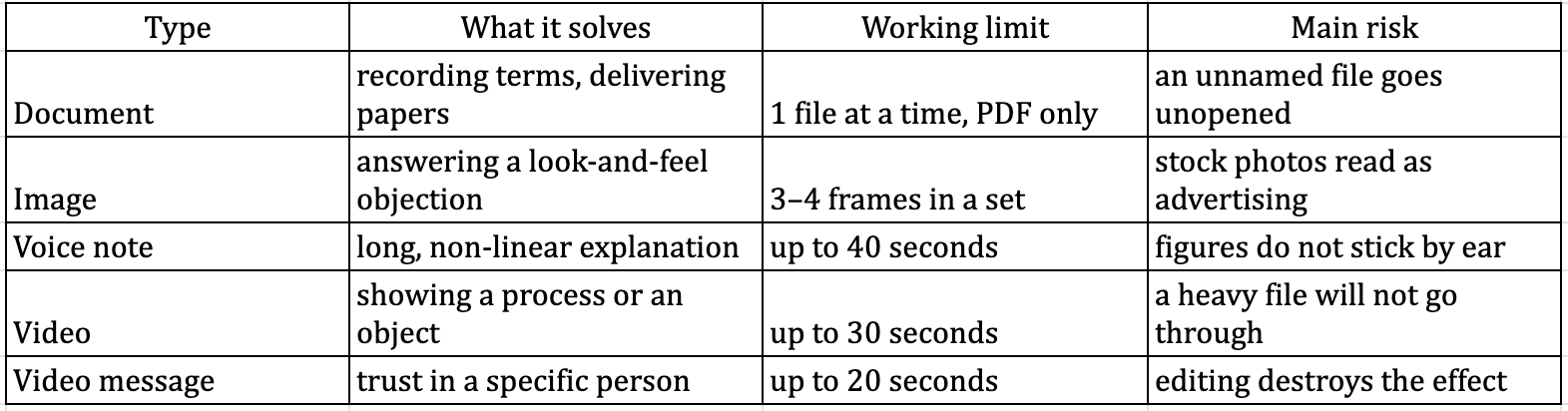
The file name decides whether the document gets opened
A file called “Contract_Smith_17_08.pdf” gets opened, “scan0034.pdf” gets ignored. The customer sees the name before opening it and decides from that whether it matters.
A covering line is mandatory. A file sent with no words at all reads as a mistake or as spam. One sentence about what is inside and what to do with it is enough.
One file at a time. A bundle of 6 documents will not get worked through, the customer opens the first and shelves the rest. Send them one by one, with gaps, if you need a response to each.
A photo library answers 80% of questions without a new shoot
A photograph in a conversation works as an argument, not as decoration. Shoot the thing that answers a specific objection.
A technique for retail. Keep a set of product shots in the CRM taken the way customers actually ask for them — next to a hand for scale, in daylight, from the back. Within a month you have a library that covers most of the questions.
Service companies get the same from before-and-after photos. The technician sends the shot from the job card and the question about quality is settled before it is asked.
Voice belongs in two situations and hurts in a third
Voice works when the explanation is long and non-linear, such as pricing with several options. And when tone matters, for instance when apologising for a delay.
Voice hurts when the customer needs to remember something or forward it to a colleague. An address, bank details, a meeting time — text only. Nobody replays a voice note to write down numbers.
On incoming voice notes. Customers send them readily and salespeople drown. Agree that any voice note over a minute gets handled straight away, otherwise by evening you have a queue nobody will work through.
A video message sells the person, not the product
Video solves the demonstration problem — how the equipment runs, what the apartment looks like, how the unit assembles. One 20-second clip saves a site visit.
A video message solves something else. It is the face of the person the customer is talking to. In high-ticket niches a short video message after first contact noticeably lifts reply rates, because the company stops being faceless.
Shoot it vertically and unedited. Polished video looks like an ad and loses the whole point of a personal message.
Expert note
One effect that rarely gets noticed is how attachments change the character of a dispute with a customer. When the two sides remember an agreement differently, the argument comes down to one word against another. In a conversation with attachments inside the customer card that argument does not arise, because you can see which file was sent, at what moment, and what the customer said afterwards. Law and accounting firms use this deliberately and send the client a written summary of the meeting the same day. It costs 5 minutes and removes most of the complaints that would otherwise follow. The technique is not limited to lawyers — any company with a long sales cycle gets the same benefit.
Storage and keeping files in order
The customer card replaces the folder on the desktop
A file sent from the card stays attached to that customer and that deal. Six months later a new colleague opens the card and sees which contract went out, which photo the customer sent and what was in the voice note.
Without it they open with “could you remind me what we sent you”, and the customer draws their own conclusions about the company.
The number belongs to the company, so attachments do not leave with the employee
Attachments on a personal phone disappear along with the phone. That is not a hypothetical risk, it is the ordinary outcome of turnover in a sales team.
When the number runs through a CRM, the whole history stays with the company. The salesperson changes, the conversation and the files stay where they are.
Three rules worth setting before you have a hundred files
Naming from 3 parts — document type, customer surname, date.
Outgoing documents in PDF only. A file sent in an editable format will eventually come back altered, and you will have nothing to prove the original wording.
Large files as links, not attachments. Platforms cap the size, and trying to push a 200 MB catalogue through will fail at the worst possible moment.
Personal data in attachments
A separate limit that usually gets remembered after an incident. A CRM screenshot showing other people’s deals, someone else’s contract, a photo of a third party’s document — none of it should reach a customer conversation, not even by accident. The check takes 2 seconds before sending and removes a risk that costs more than any single deal.
Setting the team up to use attachments
The rules fit on one page
Write down which attachment type belongs in which situation. Documents — PDF only and always with a covering line. Voice notes — under 40 seconds and never for figures. Photos — from the library, not shot on a phone on the spot.
Add a separate line on what must never be sent. That line looks obvious right up until the first incident.
A library of ready materials saves an hour a day
Assemble the set of files you send most often. Price list, bank details, instructions, warranty terms, directions.
Keep them in one place with names people understand. The saving looks trivial, but at 50 conversations a day it adds up to an hour of working time.
Test on a phone, not on a monitor
Before letting the team send attachments, run every type through a test conversation. Send yourself a PDF, a photo, a 20-second video and a voice note.
The customer will open your message on a 6-inch screen, and a document that reads beautifully in a browser may be unreadable there. The first 7 days on E-chat are free, which is enough to run the whole set of formats past real customers.
When an attachment does more harm than good
Speed of delivery is not legal force
The argument of this article is simple — send everything in the messenger and never switch channels. The counter-argument is that a document sent into a chat remains an unsigned file, and some deals require an original or a qualified electronic signature.
The limit follows from that. A messenger is fine for agreeing the wording and for recording the fact of delivery, but it does not replace the signing procedure. In practice, send the draft into the chat for speed and route the signed copy through whatever your jurisdiction accepts.
A weak connection turns a heavy attachment into an obstacle
In regions with slow mobile internet a 40 MB video will either not open at all or will eat the customer’s data. The reaction will be the opposite of what you intended.
The rule is simple. For audiences outside major cities keep a text-and-link alternative ready, and offer video rather than pushing it unannounced.
What we have not verified
We deliberately avoid quoting exact file size ceilings for Viber, Telegram and WhatsApp. They change on the platforms’ side, and any figure printed here will be stale before you use it. Test on your own number.
We also have no data on how video messages affect conversion in niches with an average order value below 50 dollars. Every observation about the personal-message effect comes from high-ticket, long-cycle deals.
FAQ:
Question: Do attachments from the customer land in the CRM or do we download them separately
Answer: Transfer works both ways, so incoming files, images, video and voice notes arrive in the card together with the message text. Nothing needs to be downloaded from the messenger by hand
Question: Do Viber, Telegram and WhatsApp differ in format support
Answer: They differ on size and on how they handle certain file types, and those rules are set by the platforms. The practical conclusion is simple — send anything heavy as a link and the difference stops mattering
Question: Can we stop salespeople from sending certain file types
Answer: Restrictions like that are set through CRM permissions and internal rules rather than on the channel side. A technical ban works less well here than a clear rule plus spot checks of conversations by the manager
Question: What do we do about voice notes when salespeople cannot keep up
Answer: Two things help. A rule that incoming voice notes are handled immediately, and speech recognition on the CRM side if it supports it. A backlog of unplayed voice notes almost always means lost deals
Question: Do attachments survive a change of company number
Answer: Yes. All communication including files stays in the customer card, because it is stored on the CRM and service side rather than tied to a particular number
Was this article helpful?
Share it with colleagues who might need it
Connect messengers to your CRM
Message clients first right from the client card and keep all conversations in your CRM. 7-day free trial, up to 40% off when connecting several numbers.