CleverBox
Connecting Telegram by Phone Number
The integration of a personal Telegram account through E-Chat allows you to receive and send messages directly in CleverBox:CRM without using separate applications.
1. Activating the Number in E-Chat
Follow the link:
https://e-chat.tech/profile/registration?ref=15ccc313-7a58-48dd-bf22-5b987b382d04
During registration, select the following option in the CRM selection window:
API - as the integration type.
After activating the number in your E-Chat account, an API Key will become available. You will need it to connect the channel to the CRM.
2. Creating a Channel in CleverBox:CRM
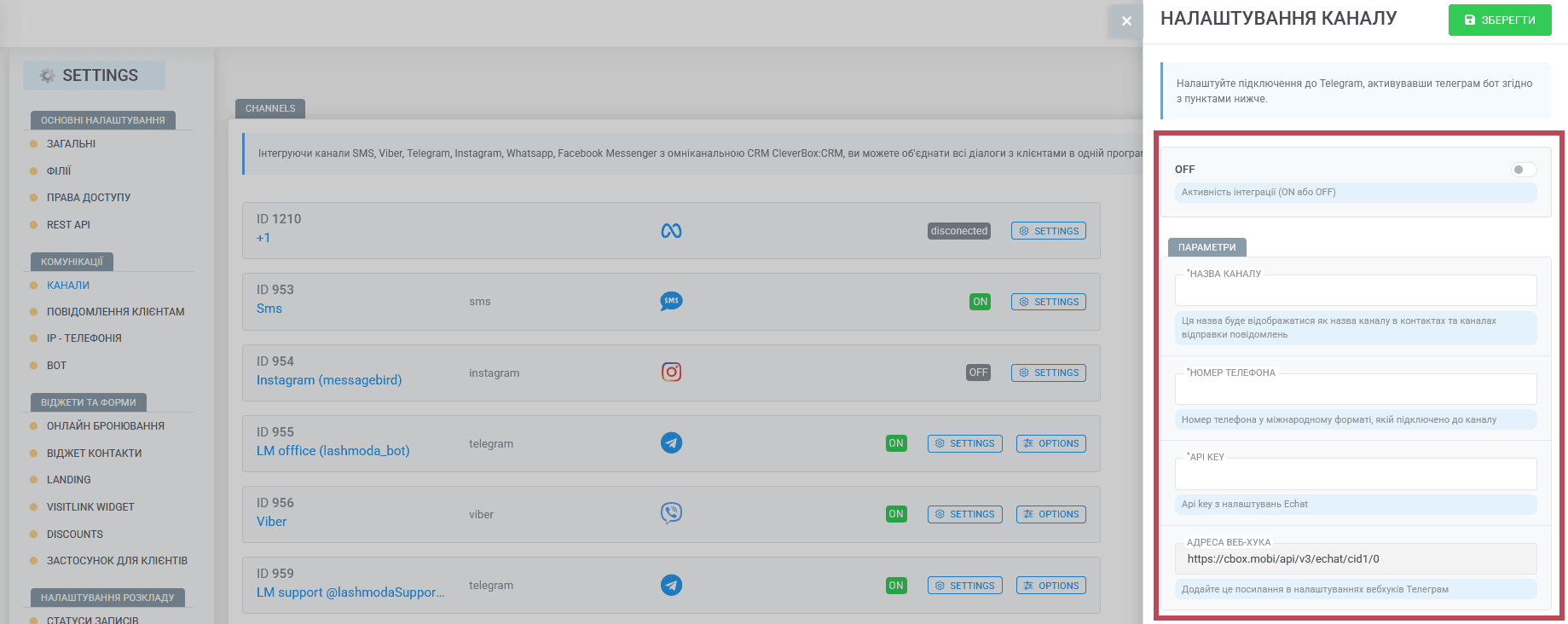
In CleverBox, go to:
Settings -> Channels
Click "Create Channel".
Select "Telegram - E-Chat".
Complete the following fields:
- Channel Name - enter any name, for example, "Salon Telegram".
- Phone Number - enter the number in international format, exactly as it appears in your E-Chat account.
- API Key - copy the key from your E-Chat account.
Click "Save".
3. Connecting the Webhook
After saving the channel, open it in CleverBox:CRM.
Copy the Webhook URL.
In your E-Chat account, open the phone number settings by clicking the gear icon.
Paste the Webhook into the "Webhook URL" field.
Click "Save".
Return to CleverBox:CRM.
Click "Activate Webhook".
If the setup has been completed correctly, the OK status will appear.
If an error occurs, check:
whether the phone number is correct;
whether the Webhook has been added to your E-Chat account.
4. Additional Settings
In the CleverBox:CRM channel settings, under "Additional Settings", you can:
- enable the automatic reply;
- configure notification sounds;
- specify which user roles will have access to the chats of this channel.
How the Telegram Channel Works
When a customer sends a message to the connected Telegram number:
- a chat is created automatically in CleverBox:CRM;
- the customer's phone number is displayed in the right-hand panel;
- if the customer already exists in the database, their customer profile will be linked automatically.
If the customer does not yet exist in the database, you can:
- link the chat to an existing customer;
- create a new customer directly from the chat.
Important
The "write first" feature is not available for this channel.
E-Chat works by emulating a personal Telegram account connection. Therefore, sending bulk messages may result in the phone number being blocked.
- the system cannot determine in advance whether the customer has an active Telegram account;
- sending messages to accounts that do not exist may be considered spam.
Channel Workflow
The customer first sends a message through Telegram.
CleverBox automatically creates a chat and a contact.
After that, the contact becomes available for further communication and reminders.
Was this article helpful?
Share it with colleagues who might need it
Connect messengers to your CRM
Message clients first right from the client card and keep all conversations in your CRM. 7-day free trial, up to 40% off when connecting several numbers.