Automated customer notifications from your CRM. 12 scenarios with triggers and timing
A salesperson who manually types “your order has been handed to the courier” 40 times a shift spends about two hours doing it. The customer still calls to ask where the order is, because the email went to an inbox they open once a week. Automated notifications from the CRM into a messenger remove both problems, but only with an accurate trigger, a considered delay and respect for the platform’s rules. Below are 12 ready scenarios with a trigger table, a calculation of the load on the customer, and the situations where automation does not help.
Key takeaways:
- A notification differs from a campaign by its trigger. It arrives because the customer did something, not because it is Tuesday
- Delay changes the outcome more than wording does. A 24-hour reminder and a 2-hour reminder solve different problems and do not substitute for each other
- The 12 scenarios below add between 3 and 7 messages per customer across a deal cycle, and that total needs calculating before launch
- Platform rules on first contact make 2 of the 12 risky, so those go live last
- Deliverability is a useless metric here. Watch the reply rate and the drop in inbound calls on the topic of the notification
- Automated notifications will not rescue a process where salespeople do not move deals through stages
Notifications and campaigns differ by trigger, not by text
The difference is not the channel and not the wording. The difference is what starts the send. A campaign starts on a marketer’s calendar, a notification starts on an event in the customer card.
One working term for what follows. The expectation window is the stretch of time during which the customer would have asked you this question themselves. A notification landing inside its expectation window reads as service. The same message sent outside that window reads as advertising. Everything else about timing is about hitting that window.
A trigger is described in one sentence with no “or” in it
The deal moved to Paid. A delivery date appeared. Three days passed since the deal closed. If describing a trigger takes two conditions and three exceptions, the scenario will fall apart in its first month of real use.
A bad sign is a trigger tied to a salesperson’s action. People forget to click buttons, particularly at month end. Anchor to whatever changes in the system automatically.
Messengers beat email on access time, not on quality
Email loses not because it is bad. It loses because the customer has to go and open it. The messenger is already open, on the first screen of the phone, next to their personal conversations.
That same fact makes the channel fragile. A misstep in a messenger reads as an intrusion rather than as spam in a promotions folder. Hence the frequency requirements below.
Replies to automated messages must land where your team already sits
The point of automated notifications is lost if the customer’s reply arrives somewhere nobody looks. Someone gets a message about their order status and answers “can we move it to Saturday” — and that “can we move it” has to land in the same deal card.
This is exactly what E-chat handles. A number on Viber, Telegram or WhatsApp connects to your CRM, automated messages go out from the system, and replies come back into the customer card alongside the full conversation history.
Twelve scenarios with triggers, delays and metrics
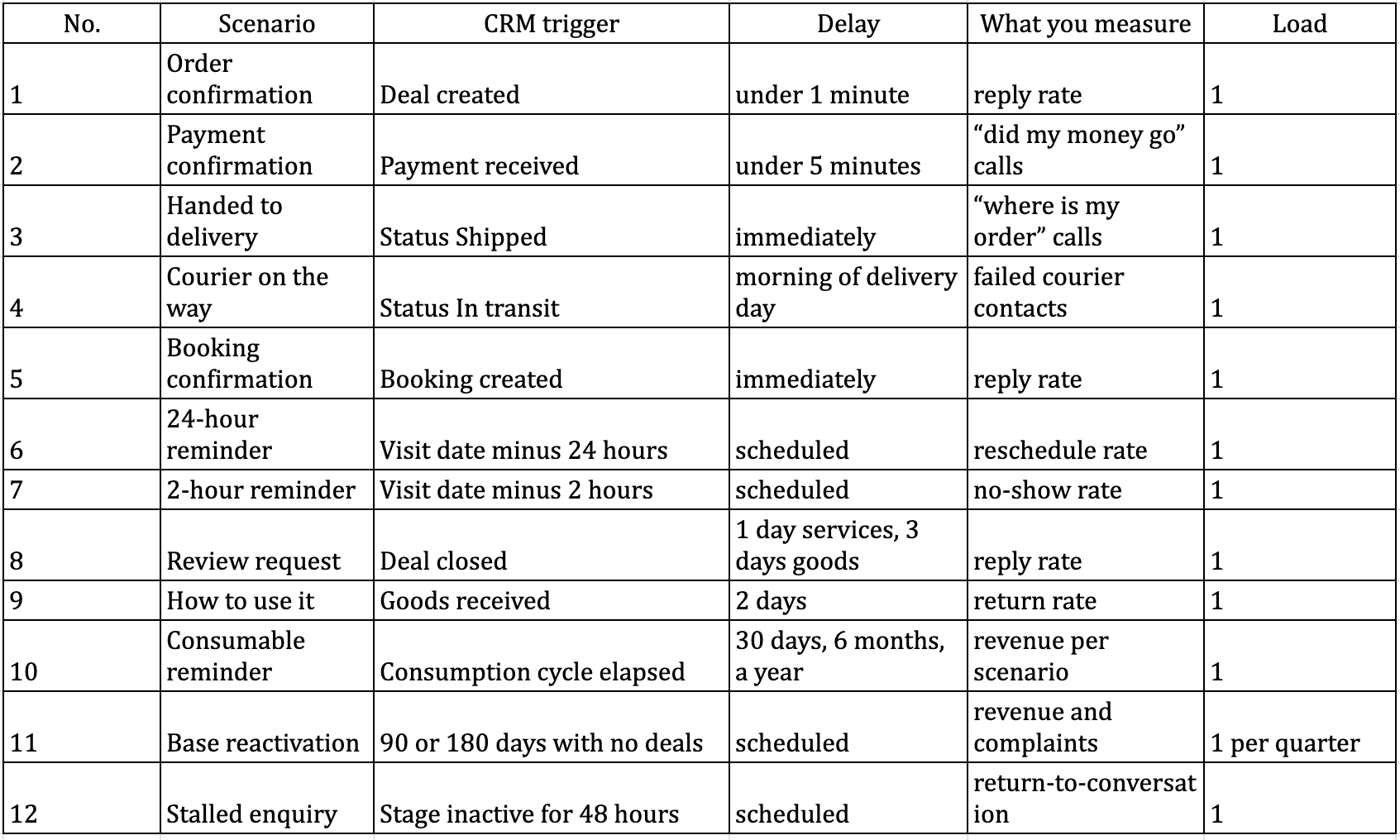
We assembled this table from reviewing the deal cycle in retail, services and after-sales. The Load column shows how many messages each scenario adds to the running total per customer.
[H3] The four order scenarios remove most of the phone calls
Order confirmation. The message carries the number, the contents, the amount and the name of the person handling it. The point is to give the customer a document inside the conversation that they can come back to. Something like “Order 4417 received, 2 items totalling 3,400. Irina is looking after it, write here with any questions.”
Payment confirmation. A separate message is needed even when payment went through online and the customer saw the success screen. Anxiety about money that has left an account produces most of the contact in the first 24 hours.
Order handed to delivery. Tracking number and estimated date are mandatory, and a tracking link belongs here.
Courier on the way. Send it on the morning of the day itself, not the evening before. This message reduces failed courier contacts more than any of the other 11.
[H3] Splitting reminders into 24 hours and 2 hours solves two different problems
The 24-hour reminder exists for rescheduling. It gives the customer a chance to cancel early enough for the slot to be filled, so the text explicitly offers another time.
The 2-hour reminder exists for attendance. It is there so the person does not forget and leaves on time. Shorter text, no questions, just the time and the address.
Clinics and salons that keep only the 24-hour reminder lose the people who forget on the morning itself. Those that keep only the 2-hour one have no time to fill the slot that opens up.
[H3] Scenario 10 produces revenue with no ad budget
A reminder about a consumable or scheduled service is tied to the consumption cycle. Filters after six months, lenses after 30 days, servicing after a year.
It is the most underrated of the 12, because it works on customers you have already paid to acquire once. It measures directly, since the resulting deal is attached to a specific automated message in the card.
[H3] Scenarios 11 and 12 go live last
Reactivating a dormant base and returning to a stalled enquiry differ from the other ten in that some recipients have not written to you in a long time. To the platform such a contact is close to a new one.
Personalise reactivation by the last purchase and send it no more than once a quarter. On stalled enquiries, write as though a person remembered them — one short line with a question outperforms a reminder attached to a discount.
[H2] Building a scenario takes four steps and no developer
Between deciding you need automated notifications and having a working chain sit data preparation, channel choice, templates and testing.
[H3] Empty fields break substitution long before platform limits do
A notification pulls data from the card. If the visit date field is empty for half your customers, the chain will send messages with a hole in the text.
Before launch, check how consistently every field used in a template is populated. Look separately at your pipeline stages — if salespeople drag deals straight from New to Paid, the intermediate notifications will never fire at all.
[H3] Choose the channel by the customer’s country and how they got in touch
The practical rule is to write back where the person first wrote to you. They came in on Viber, so all subsequent service goes through Viber.
For customers from the website or the phone, go by market. According to Infobip’s report on messenger popularity by country, updated in May, Viber remains the first choice in Bulgaria, Telegram in Uzbekistan and WhatsApp in Brazil. The source is at infobip.com/blog/most-popular-messaging-apps-by-country. Numbers on all three messengers can sit under one CRM with the right one selected by country.
[H3] More than five variables in a template raises the error rate
Name, order number, amount, date and the salesperson’s name cover almost all 12 scenarios. Every additional variable increases the chance a customer receives text with a blank in it.
On length, use this guide. The message should fit into a lock-screen notification, which is roughly two lines. Anything longer gets read noticeably less.
Expert note
The most common implementation mistake is switching everything on at once. A company configures 8 chains in a week, launches them, and a month later sees complaints rising with no way to tell which chain caused it. The right order is different. Start with the two transactional notifications customers want most, usually order confirmation and delivery status. Watch for two weeks. Then the reminders. And only once your base is used to receiving useful messages from you — reactivation and review requests. Companies that follow that sequence keep opt-outs and complaints noticeably lower than those who switch everything on together.
[H2] Platform rules on first contact dictate the launch order
The section competitors skip, and the one that decides whether your number still works in three months.
[H3] A contact who has never replied counts as new
Messengers treat messages to unfamiliar numbers more strictly than conversations with people who wrote to you. Viber explicitly restricts messages to new contacts, Telegram is noticeably more relaxed.
The practical rule is that a contact is new to the platform however many products they have bought from you, as long as they have never replied. Warm the base with transactional messages people respond to naturally.
[H3] Three messages per order is normal, seven is grounds for a block
Before switching on another scenario, add up every automated message one customer receives across a deal cycle and look at the total in the Load column above.
Agree a rule about nights, separately. Automation does not sleep, the customer does. Every notification except genuinely urgent ones such as “the courier is at your door” should have a sending window between 9am and 9pm in the customer’s time.
[H4] What to do with undelivered messages
Some messages will not arrive — the customer does not use that messenger, the number changed, the app was deleted. The sensible pattern is this. On non-delivery, raise a task for a person to call rather than firing a second automated message into the same channel. Flag the number in the CRM so later scenarios skip it.
[H4] The exception for customers with several open orders
A specific case that breaks the load calculation. A wholesale or repeat customer with four open orders receives every transactional notification multiplied by four. For contacts like these it makes sense to assemble one daily summary instead of a separate message per deal.
[H2] Judging payback rests on four metrics, and deliverability is not one of them
[H3] Reply rate shows whether the channel reads as a conversation
If 5–8% of customers reply to a delivery notification, the channel is alive. Zero replies means the message reads as a robot and gets scrolled past.
The second metric is the change in inbound contact on the topic of the notification. A well-timed “where is my order” removes those calls almost entirely. If the calls remain, the message is arriving too late or lacks the information people need.
The third is the no-show rate for scenarios 5, 6 and 7. Measuring before and after is the only honest way to judge reminders.
The fourth is revenue from scenarios 10 and 11, which measures directly.
[H3] High deliverability tells you nothing about value
Deliverability in messengers is high almost always, which makes it useless to watch. It confirms the plumbing works and nothing more.
Judge by behaviour after the message. Replied, followed the link, arrived at the appointed time, did not call support — those are the events that add up to a result.
[H3] Replies to automated messages work as free research
People write things in response to notifications that they would never put in a survey.
Every fortnight, read through the conversations generated by your scenarios and note the recurring questions. Each recurring question is either a new line in a template or a new scenario. A quarter of that practice typically turns a list of 12 scenarios into 15.
[H2] When automated notifications produce nothing
An honest look at the limits. Below are three situations where implementation will not pay off, and one area where we cannot give a firm answer.
[H3] Automation does not fix a process that fails manually
The familiar claim is that notifications take routine work off your team. The counter-argument is that notifications hang off statuses, and the same people move those statuses. If deals sit on one stage for weeks, the automation simply never fires.
The limit follows from that. Implementing notifications makes sense once the pipeline reflects the real process and people genuinely use it. In practice, spend two weeks watching how deals move, then build scenarios.
[H3] Low volume does not repay the setup
At 10 orders a day a salesperson sends statuses by hand faster than you can configure and test 12 chains. The threshold where automation starts saving anything sits around 30 deals a day or three people in the team.
The exception is scenarios 6 and 7. Visit reminders pay off at any volume, because every no-show costs an entire slot.
[H3] What we have not verified
Everything above applies to transactional and service messages in retail, services and education. For long business-to-business deals with several approvers we have no data on how automated notifications affect conversion, and the thresholds in this article should not be carried over to them.
One further caveat on scenario 11. Reactivation produces such a wide spread of results that an average figure would be meaningless. The only sound approach is a launch on 10% of the base with revenue and complaints measured.
[H2] Launch order on your own system
[H3] Pick your first three scenarios from your call volume
Take the customer journey and mark the three points where people most often call with a question. Those are your first scenarios, the rest can wait.
Next you need a messenger number connected to your CRM. With E-chat that is four steps — register, activate the number, let it sync, connect to the CRM. The first 7 days are free, which is enough to run two or three scenarios past real customers.
[H3] Rolling out to 10% costs less than investigating an incident
Run every scenario on yourself and on five colleagues. Check substitution on a customer with a long name, with a blank middle name, and with a single-item order.
Then switch the scenario on for 10% of the base and wait a week. This adds a fortnight to the project and spares you the situation where an unfortunate turn of phrase goes to 4,000 customers at once.
FAQ:
Question: Do we need a separate campaign tool if we already have a CRM and connected numbers
Answer: No, as long as your CRM can trigger actions. The system defines the sending logic and the platform delivers the message through the connected number. A separate tool is only needed for mass promotions, which are a different thing from notifications
Question: Can automated notifications go from the same number the team writes from
Answer: Yes, and usually that is better. The customer sees one company number and the automated messages sit in the same thread as the human conversation. Splitting numbers makes sense at very high automation volumes when you want to isolate the risk
Question: What happens to the scenarios if we change the number
Answer: The conversation stays in the customer card, and the scenarios need remapping to the new number in settings. Customers will see messages from a new number, so the first message after the change should open by identifying the company
Question: What about customers who use none of the three messengers
Answer: For them the scenario should end in a task for a person rather than in silence. In the CRM this is a condition at the sending step. That group is usually under 10% and keeps shrinking
Question: Does an order status notification count as advertising
Answer: A transactional message about fulfilling an obligation to a customer is not advertising. The line is crossed the moment the text suggests buying something else. Mixing the two in one message is a bad idea legally and in terms of how it is received
Was this article helpful?
Share it with colleagues who might need it
Connect messengers to your CRM
Message clients first right from the client card and keep all conversations in your CRM. 7-day free trial, up to 40% off when connecting several numbers.